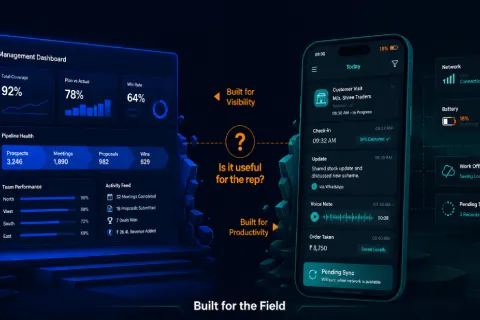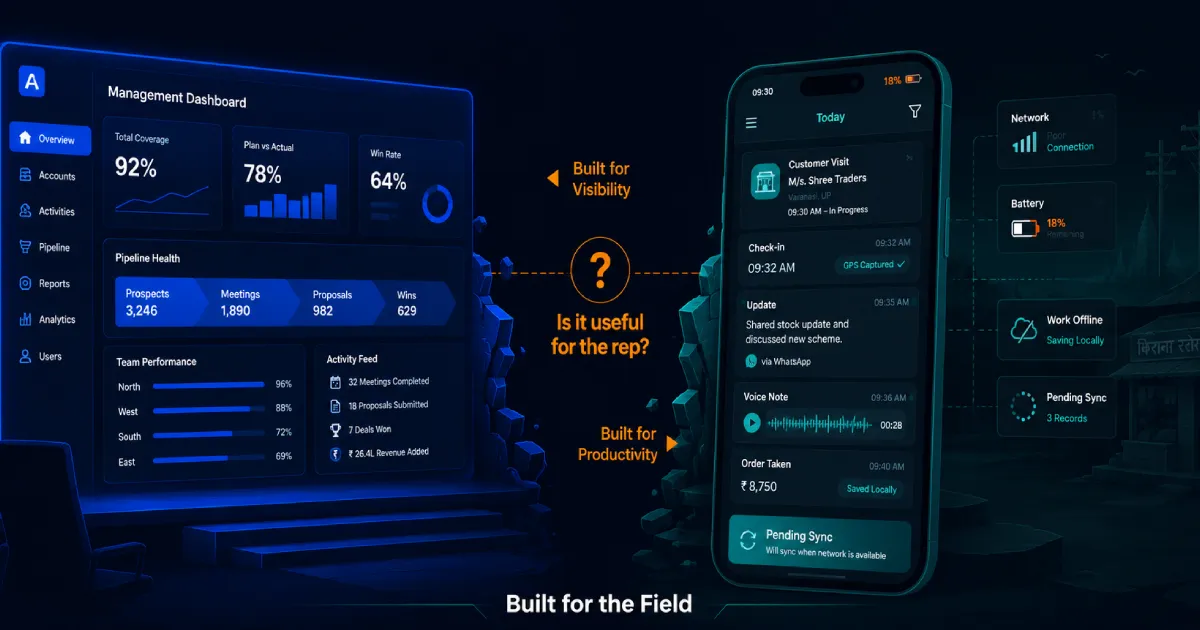

Indian sales leaders often face a familiar problem: a high-priced sales tool gets rolled out with confidence, but within weeks it becomes little more than an attendance tracker. The CRM is live. The dashboards are active. The app is installed. Yet frontline teams still report on WhatsApp, update data at day-end, or enter fake information just to satisfy system requirements.
The issue is rarely resistance to technology. It is resistance to friction.
A field officer moving through Nagpur in 42-degree heat, a distributor salesperson navigating Kanpur’s wholesale markets, or a banking agent visiting customers across semi-urban branches is not thinking about data hygiene. Their priority is speed, trust, and the next conversion. If the sales tool adds work without helping them earn more, save time, or serve the customer better, adoption will fail.
The disconnect usually comes from a gap between boardroom expectations and ground reality. Many tools are designed for management visibility, not field productivity. They assume stable connectivity, high-end devices, English-first navigation, patient users, and clean workflows. Indian field sales rarely works that way.
Mandates, salary hold-backs, and daily reminders may force usage for a short time, but they do not create adoption. Real adoption happens when the tool becomes useful to the rep before it becomes useful to the manager.
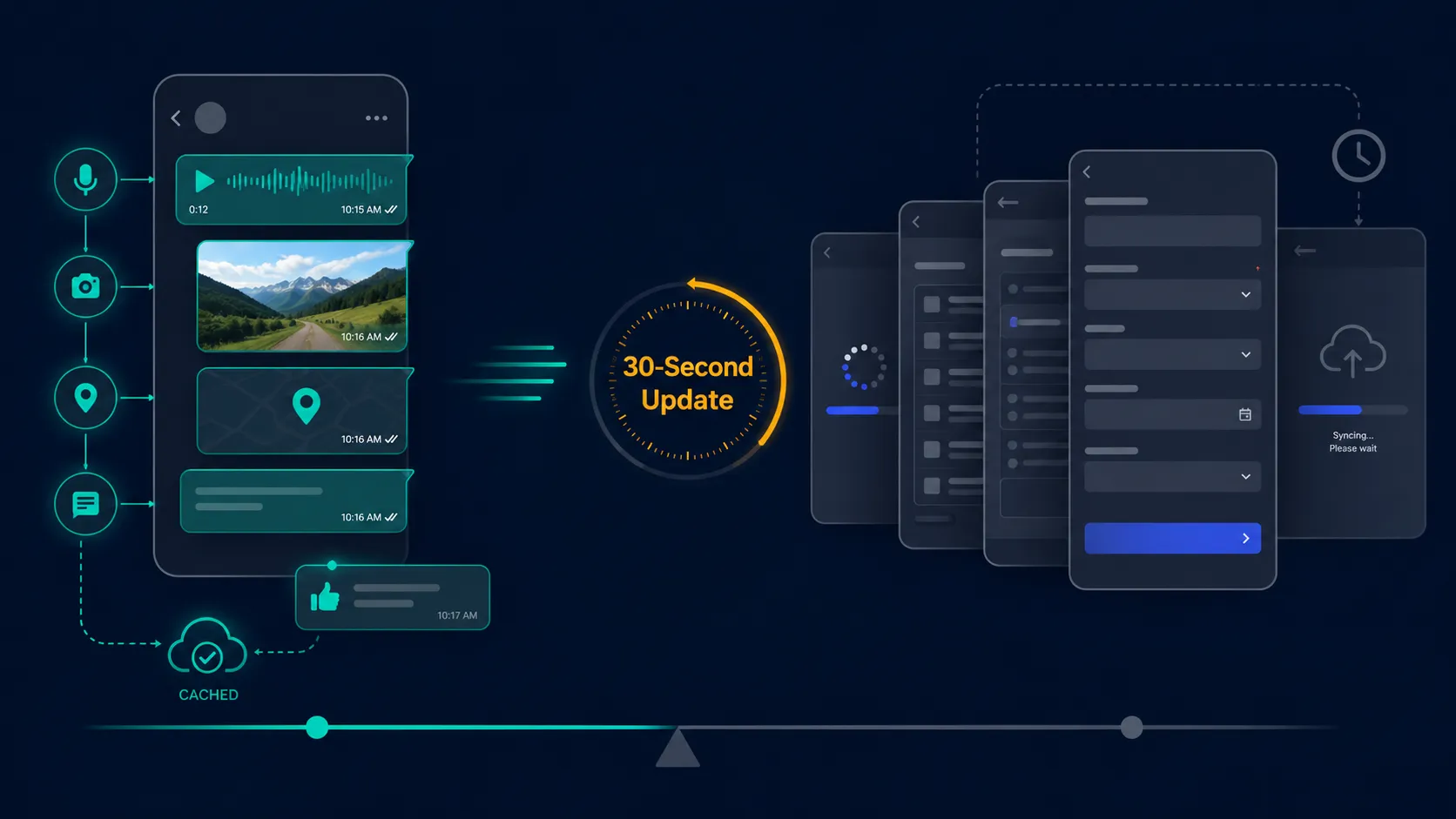
Field agents prefer WhatsApp because it matches how work actually happens. A rep can send a message, photo, voice note, location, or document in seconds. Most CRM apps still require navigation across modules, record loading, mandatory fields, dropdowns, and sync delays just to log one activity.
This difference matters because field sales is a speed game. If logging a customer visit takes longer than the visit itself, the rep will bypass the system. WhatsApp also works better in low-connectivity environments because messages are cached and sent automatically when signal returns. Reps trust that the update will not disappear into a loading screen.
There is also a psychological advantage. WhatsApp gives instant acknowledgement. A manager can respond with a thumbs-up, ask a quick question, or give direction. CRM entries often feel like sending data into a black hole.
The answer is not to fight WhatsApp behavior blindly. It is to learn from it. Sales tools need voice-first updates, photo capture, offline save, fast logging, and conversational workflows. If the official tool cannot match the convenience of WhatsApp, reps will continue using WhatsApp as the real system of work.
Pro Tip: Apply a 30-second rule. If a rep cannot log a visit, update an outcome, or capture a follow-up in under 30 seconds, the workflow is too heavy.
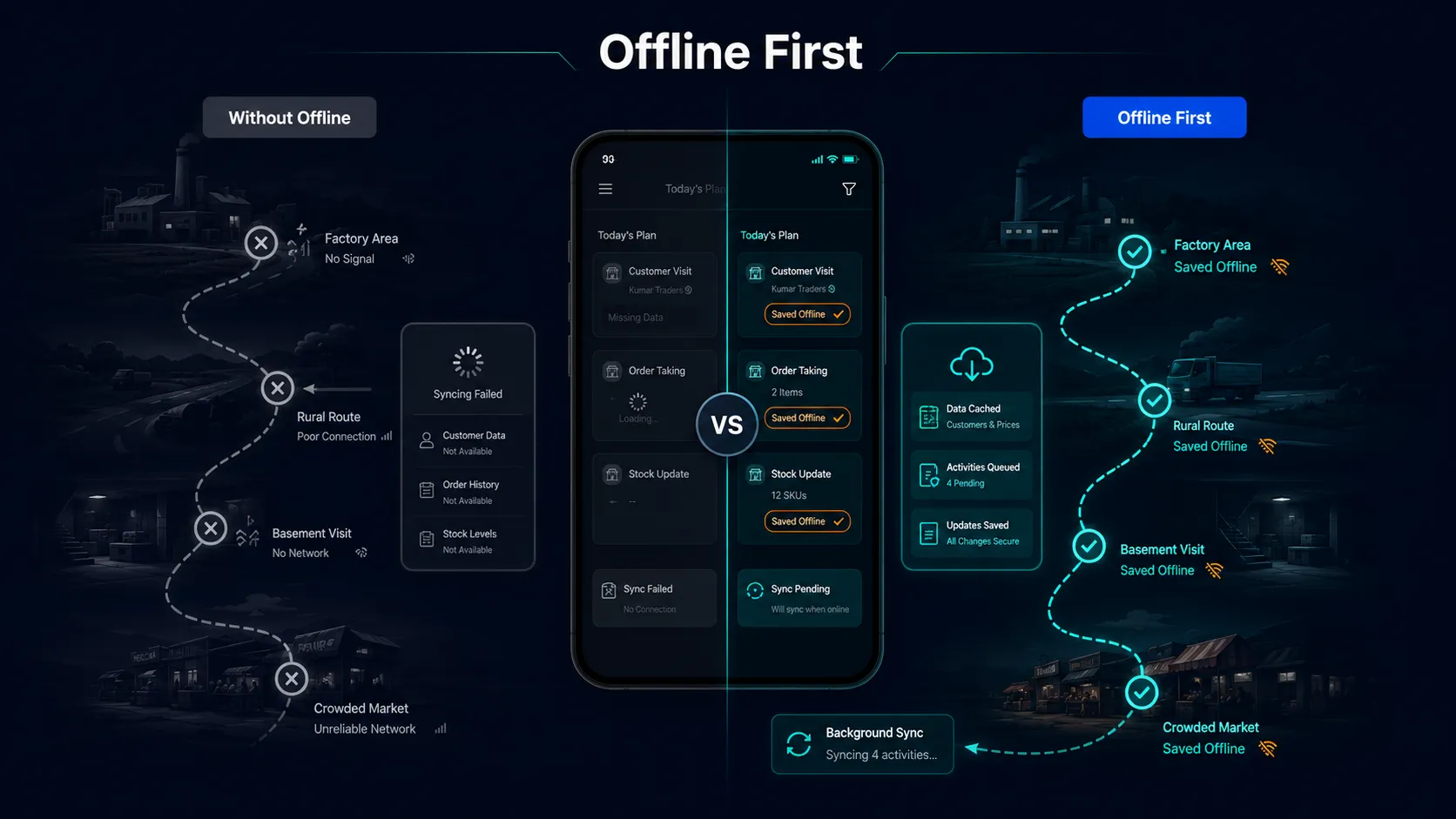
Indian field teams often operate in low-connectivity zones: rural areas, basements, factories, highways, older commercial buildings, and crowded markets. If a sales app needs continuous internet to function, it fails at the exact moment the rep needs it most.
Poor offline performance damages data quality first. Reps fall back on memory, paper notes, or WhatsApp messages. Later, when they re-enter the information, details get missed: product discussed, follow-up date, commitment made, customer objection, or order quantity. The organization gets delayed data and the rep gets extra work.
It also weakens customer confidence. A rep who cannot show inventory, pricing, policy details, or a quote because the app is not loading appears unprepared. In competitive markets, that delay is enough for the customer to rethink the purchase or contact another provider.
Offline functionality should not feel like a backup feature. It should be core to the product. Reps should be able to access key customer information, capture updates, generate basic documents, and queue activities without signal. Syncing should happen quietly in the background once connectivity returns.
Pro Tip: Test the app where your reps actually work, not in the office. If the full customer flow fails in a known low-network area, your offline design is not field-ready.
English-only tools create a hidden adoption barrier for regional field teams. The problem is not just language fluency. It is speed, confidence, and accuracy under pressure.
A rep standing in a noisy market or sitting with a customer does not have time to translate complex app labels in their head. If “save draft,” “submit,” “disposition,” “follow-up,” and “conversion status” are not instantly clear, errors increase. The rep uses only the minimum required features and ignores anything that feels risky or confusing.
Language also affects dignity. When a tool speaks the rep’s language, it feels like an assistant. When it speaks only corporate English, it feels imposed. This matters in India, where large sales teams work across Hindi, Tamil, Telugu, Marathi, Bengali, Kannada, Gujarati, Malayalam, Punjabi, Odia, and many mixed-language environments.
Localization should go beyond translation. The interface should reflect how people actually speak on the ground. In many cases, transliteration, icons, voice input, and simple color-coded confirmations work better than formal textbook translations.
Pro Tip: Watch a field rep use the app in their real environment. If they pause for more than two seconds on a screen, the navigation is not intuitive enough.
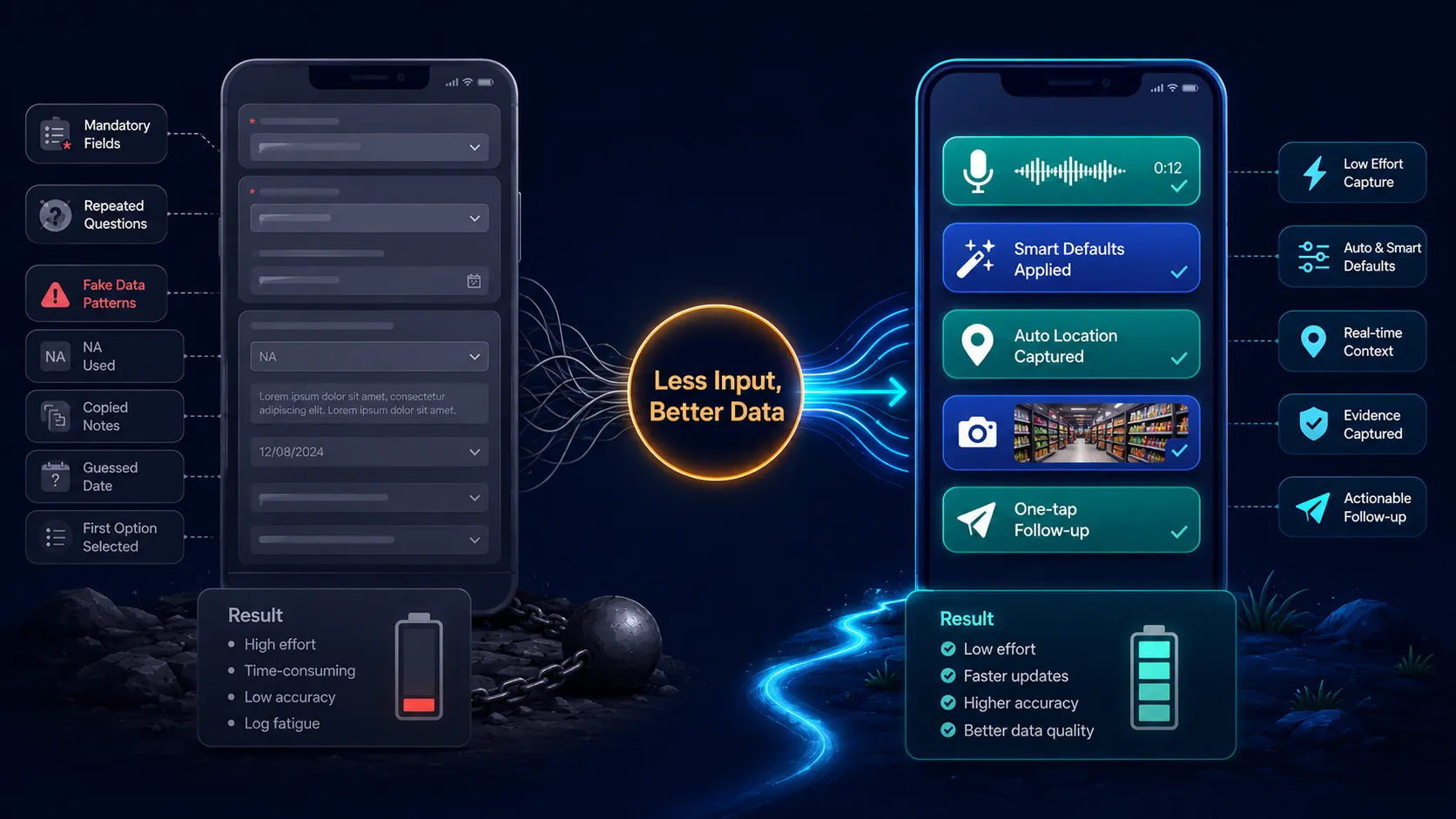
Log fatigue begins when the effort required to enter data feels higher than the value received from the tool. Reps are then motivated to clear the screen, not capture the truth.
This is how fake data starts. “NA” is entered into text fields. The first option is selected in dropdowns. Follow-up dates are guessed. Meeting notes are copied and pasted. Locations are captured later. The rep is not always being dishonest; often the system has trained them to prioritize completion over accuracy.
The business impact is severe. Bad field data damages forecasting, manager visibility, incentive calculation, customer follow-ups, and AI recommendations. A dashboard built on weak data gives leadership confidence without truth.
The solution is to reduce manual input and collect only what is used. Every mandatory field should pass a hard test: does this data point improve customer experience, compliance, seller productivity, or business decision-making? If not, remove it from the field workflow.
Use smart defaults, voice notes, auto-capture, location tagging, dropdowns only where necessary, and progressive profiling. Do not ask the rep to fill everything at once.
Pro Tip: Shift from “data collection” to “data exchange.” If the rep gives the system information, the system should give back a recommendation, saved time, or a useful next step.
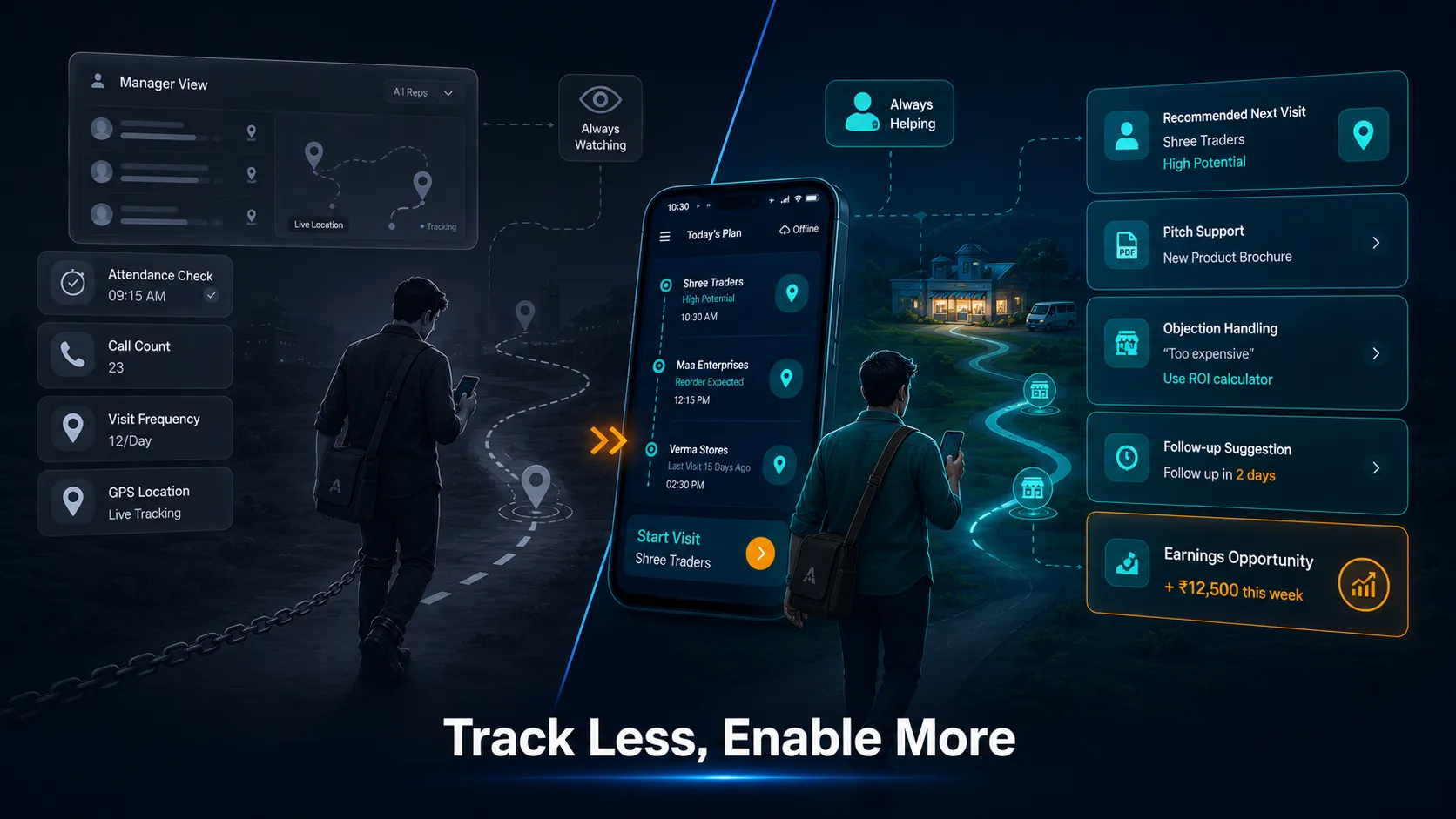
Many field tools fail because reps believe they are built to monitor them, not help them. This perception grows when the tool tracks attendance, location, call counts, and visit frequency, but does not help the rep close more business.
When leadership uses the tool mainly to question activity, the rep sees it as a digital leash. If the app demands updates but gives no guidance, no customer insight, no pitch support, and no follow-up help, the relationship becomes one-sided. The rep feeds the system. The manager gets reports. The rep gets pressure.
To change this perception, organizations must shift from tracking people to improving progress. The tool should help the rep decide who to meet, what to say, what to show, how to handle objections, and when to follow up. When the tool saves time or increases earning potential, adoption improves naturally.
Transparency also matters. Reps should know how their data is used and how it benefits them. If data improves lead allocation, incentive calculation, coaching, or customer prioritization, make that visible.
Pro Tip: For every tracking feature, add an enablement feature. If the app captures a visit, it should also help the rep move the customer forward.
Sync lag is not a minor technical issue. It affects rep income.
If an app takes several minutes across the day to load records, upload photos, refresh pricing, or submit orders, the rep loses selling time. Even seven minutes of delay across eight customer visits can remove nearly an hour from the day. Over a week, that can mean several fewer visits and fewer conversion opportunities.
Slow sync also creates dead air in front of customers. When the app hangs while loading a quote, inventory status, or product detail, sales momentum drops. The customer waits. The rep loses confidence. The conversation becomes awkward.
Stale data creates another problem. If the app has not synced properly, the rep may quote old pricing, promise unavailable stock, or miss a relevant upsell. Later, the rep must repair the mistake through calls, apologies, and revised commitments. That is zero-revenue work.
Field apps must be optimized for low-bandwidth conditions, lightweight sync, cached data, and clear sync status. Reps should know what is saved, what is pending, and what failed.
Pro Tip: Measure sync delay as lost selling time. Technical performance should be treated as a revenue metric, not only an IT metric.
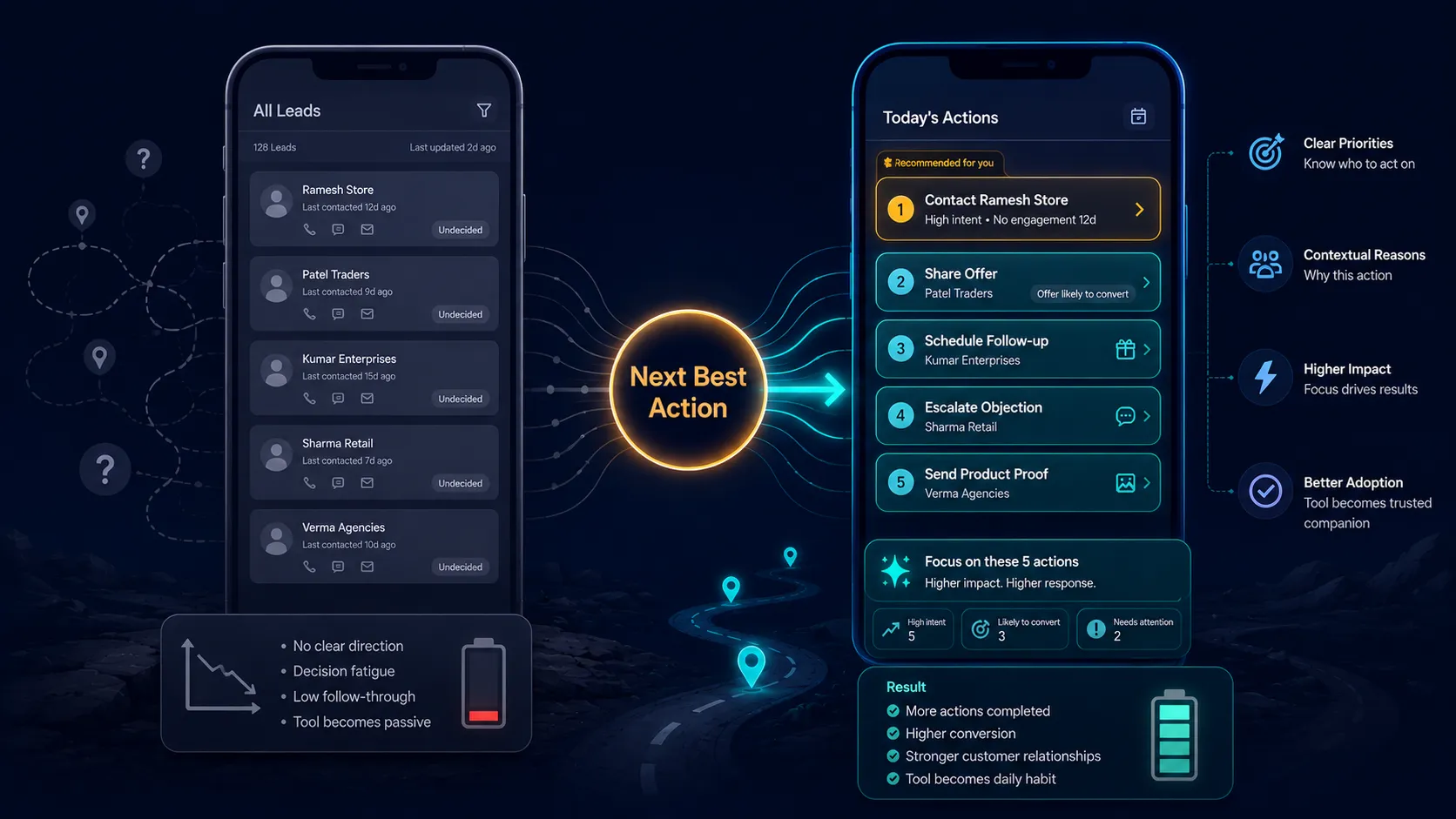
Many sales tools are passive repositories. They store leads, activities, and customer details, but they do not guide the rep on what to do next. For frontline teams, that is not enough.
A field rep is usually managing multiple customers, routes, products, objections, schemes, and follow-ups. Without next-best-action prompts, the rep has to decide everything manually: whom to prioritize, what to say, which offer to present, what follow-up to schedule, and when to escalate.
This creates decision fatigue. Eventually, reps rely on memory and instinct instead of the tool. Once that happens, the tool becomes a reporting burden rather than a sales companion.
Next-best-action prompts make the tool useful in the moment. They can suggest a follow-up for an inactive lead, recommend a product based on customer profile, remind the rep to share a specific document, flag a missed commitment, or surface a relevant offer. The value is not just data visibility. It is execution guidance.
Pro Tip: Move from “what happened” to “what to do next.” A dashboard that says territory sales are down is less useful than a prompt that says which five customers should be contacted today and why.
Battery drain creates constant anxiety for field teams. When a rep has to monitor battery percentage throughout the day, the tool becomes a source of stress. In roles where the phone is used for calls, maps, payments, photos, WhatsApp, and CRM updates, a power-hungry app is not just inconvenient. It can disrupt the entire workday.
If a device dies during a customer meeting, order capture, KYC step, or payment process, the rep looks unprepared. They may be blamed for delays caused by bad software or aging hardware. Over time, this creates resentment toward the tool and the organization that forced it on them.
Battery-heavy apps also create bad workarounds. Reps turn off GPS, avoid syncing, reduce screen brightness to unusable levels, or delay updates until they reach a charger. The organization then loses real-time visibility.
Field apps should be designed for duration, not just features. Background sync, location tracking, media uploads, and notifications must be optimized carefully. Device quality and battery health should be monitored proactively.
Pro Tip: Make “full-shift survival” a product requirement. A field app that cannot last a normal working day is not ready for frontline deployment.
Top-down software rollouts fail because they assume the field will adapt to the tool. In reality, the tool must adapt to the field.
Leadership often selects platforms based on dashboards, integrations, and reporting capabilities. But the frontline experiences the tool through small frictions: extra clicks, slow loading, confusing labels, repeated fields, missing offline access, or workflows that do not match how customer conversations happen.
When these frictions are ignored, reps create workarounds. They use spreadsheets, WhatsApp, notebooks, screenshots, or personal reminders. These workarounds help them survive the day, but destroy system adoption and data quality.
Field feedback loops prevent this. Before and after rollout, product teams and sales leaders should observe reps in live environments. They should track where users hesitate, where they abandon screens, where data becomes inaccurate, and where the tool interrupts customer flow.
The best implementations create field champions: respected reps who test workflows, challenge unnecessary features, and explain what will actually work on the ground.
Pro Tip: Change the success metric from deployment completion to field usefulness. The rollout is not successful when the app is installed. It is successful when reps prefer using it.
Simplification is not a design preference. It is a revenue strategy.
When mobile interfaces are simple, adoption rises. When adoption rises, data quality improves. When data quality improves, managers can coach better, leaders can forecast better, and reps can receive better recommendations. The ROI compounds across the system.
A simple UI also gives back selling time. If a rep saves ten minutes after every meeting because logging is easier, that time can be used for more visits, better follow-ups, or stronger customer conversations. Across hundreds or thousands of reps, the productivity gain is significant.
Simplification also protects experienced sellers. Many senior reps have strong customer relationships but limited patience for over-engineered tools. If the app feels difficult, they resist it. If it supports their workflow, they adopt it.
The best mobile interfaces for field sales are task-based, not feature-based. A rep does not need a full CRM menu on the home screen. They need clear actions: log meeting, view today’s leads, follow up, add customer, capture order, share content, update outcome.
Pro Tip: Design for the least tech-comfortable high-performing rep. If they can use the tool easily in the field, adoption across the team will improve.
Conclusion
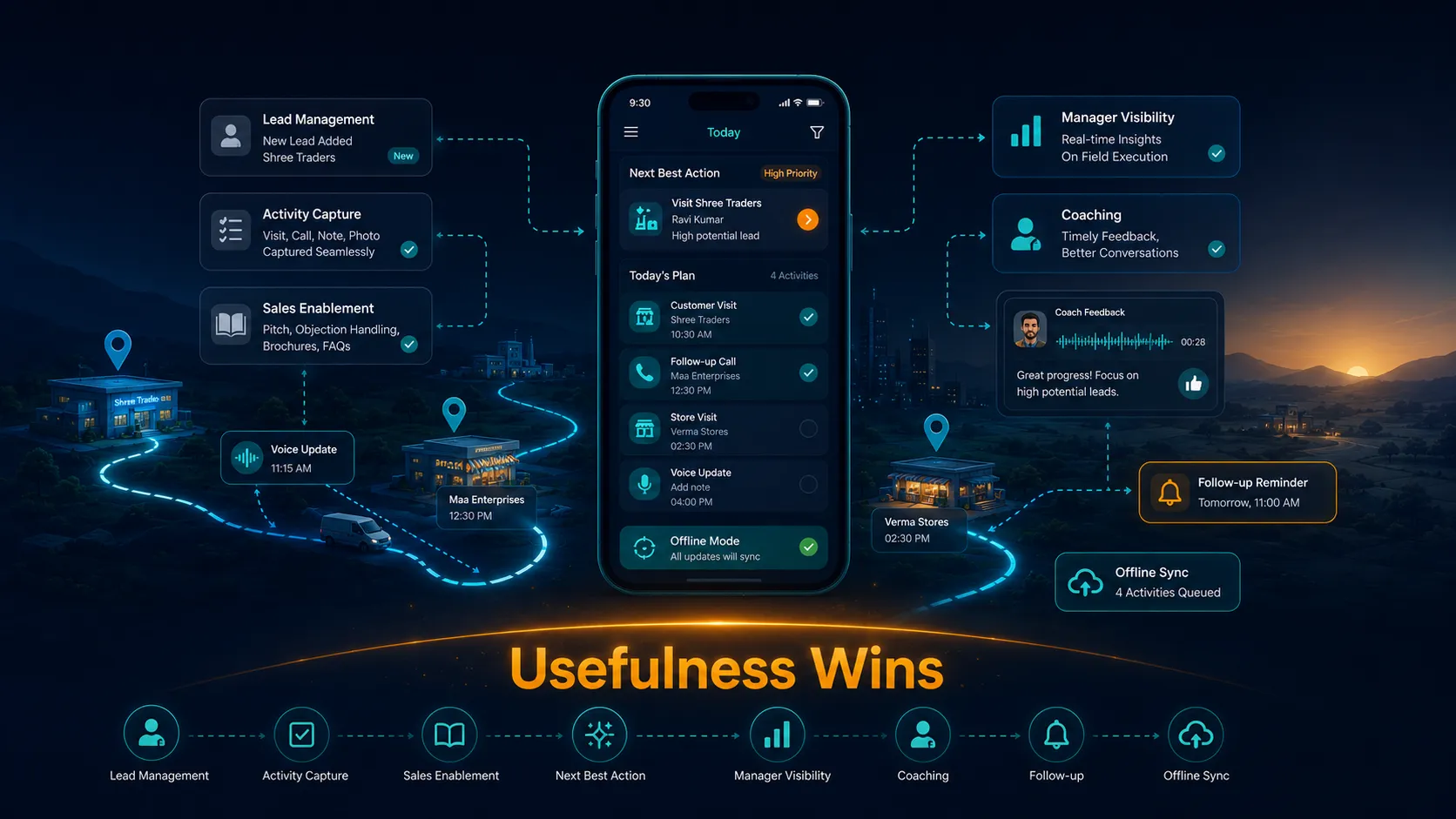
Field sales adoption in India is rarely a pure technology issue. It is a design, trust, and usefulness issue. When a tool feels like surveillance, consumes time, drains battery, fails offline, or adds data entry without helping the rep sell, frontline teams will avoid it.
The real question is not “How do we force adoption?” The better question is “Why would the rep choose this tool when no one is watching?”
Successful sales tools in India must respect field realities: patchy connectivity, regional languages, low patience for admin work, battery constraints, high customer pressure, and the need for speed. They must also deliver value back to the rep through faster updates, guided next actions, useful content, and simpler follow-ups.
This is where Sharpsell’s approach is relevant in a quiet but important way. When lead management, activity capture, sales enablement, manager visibility, coaching, and next-best-action guidance sit in one execution flow, the tool becomes less about reporting and more about helping the field move work forward. Sellers are not left to search, remember, or manually reconstruct every interaction. Managers get visibility without forcing the frontline into heavy administrative routines.
Indian field teams do not reject technology. They reject tools that make their day harder. Build for the ground reality first, and adoption stops being a compliance problem. It becomes the natural outcome of usefulness.
What’s a Rich Text element?
The rich text element allows you to create and format headings, paragraphs, blockquotes, images, and video all in one place instead of having to add and format them individually. Just double-click and easily create content.
Static and dynamic content editing
A rich text element can be used with static or dynamic content. For static content, just drop it into any page and begin editing. For dynamic content, add a rich text field to any collection and then connect a rich text element to that field in the settings panel. Voila!
How to customize formatting for each rich text
Headings, paragraphs, blockquotes, figures, images, and figure captions can all be styled after a class is added to the rich text element using the "When inside of" nested selector system.
zdxfhgfg
- sdnslk,xdv
- SDlknjsdv
- SDvlknj
- sdgdf v